



A familiar first month in paid advertising runs like this. A company opens a Google Ads account, accepts what the setup wizard suggests, spends ₹40,000, and gets a few hundred clicks that turn into two enquiries, one of them a salesperson. The owner concludes that paid ads do not work in their market. What the month tested was not the channel. It was the default settings: a Smart campaign, broad match keywords, Display placements switched on and no negative keywords, a configuration that answers Google’s questions rather than the advertiser’s.
The channel is worth setting up correctly, because it is the fastest test available for the question that matters most: will people who are looking for your service fill in your form? Content takes months to rank. Referrals arrive on their own schedule. A funded search campaign puts your page in front of buyers this week, and within a few hundred clicks it says whether the page converts them. Paid social answers a different question, whether people who fit your buyer’s profile can be interrupted into caring, and it takes more patience and more money to read.
The difference between that wasted month and a fair test is not talent or budget size. It is a short list of settings the platforms do not default to, plus a budget sized to the number of clicks a test needs rather than to a comfortable round figure. Both are learnable in an afternoon.
This article sets out a first Google Ads campaign step by step, from account structure to the settings worth changing at launch. It then weighs LinkedIn against Meta for business buyers, including who should skip paid social entirely, and closes with a funnel diagnostic for the campaign that runs but does not produce. It covers one stage of the end-to-end lead generation process, and it assumes the earlier stages, a clear offer and a page worth landing on, already exist.
A well-built campaign that fails has bought an answer. A badly built one that fails has bought nothing.
In this article
How to run your first paid search campaign
A first Google Ads campaign exists to find out whether people who search for your service will fill in your form, and it answers that question in weeks rather than months. Everything below is the shortest path to that answer. It assumes you sell something people search for by name or by problem. If nobody searches for what you sell, skip to the paid social section.
How the account is structured
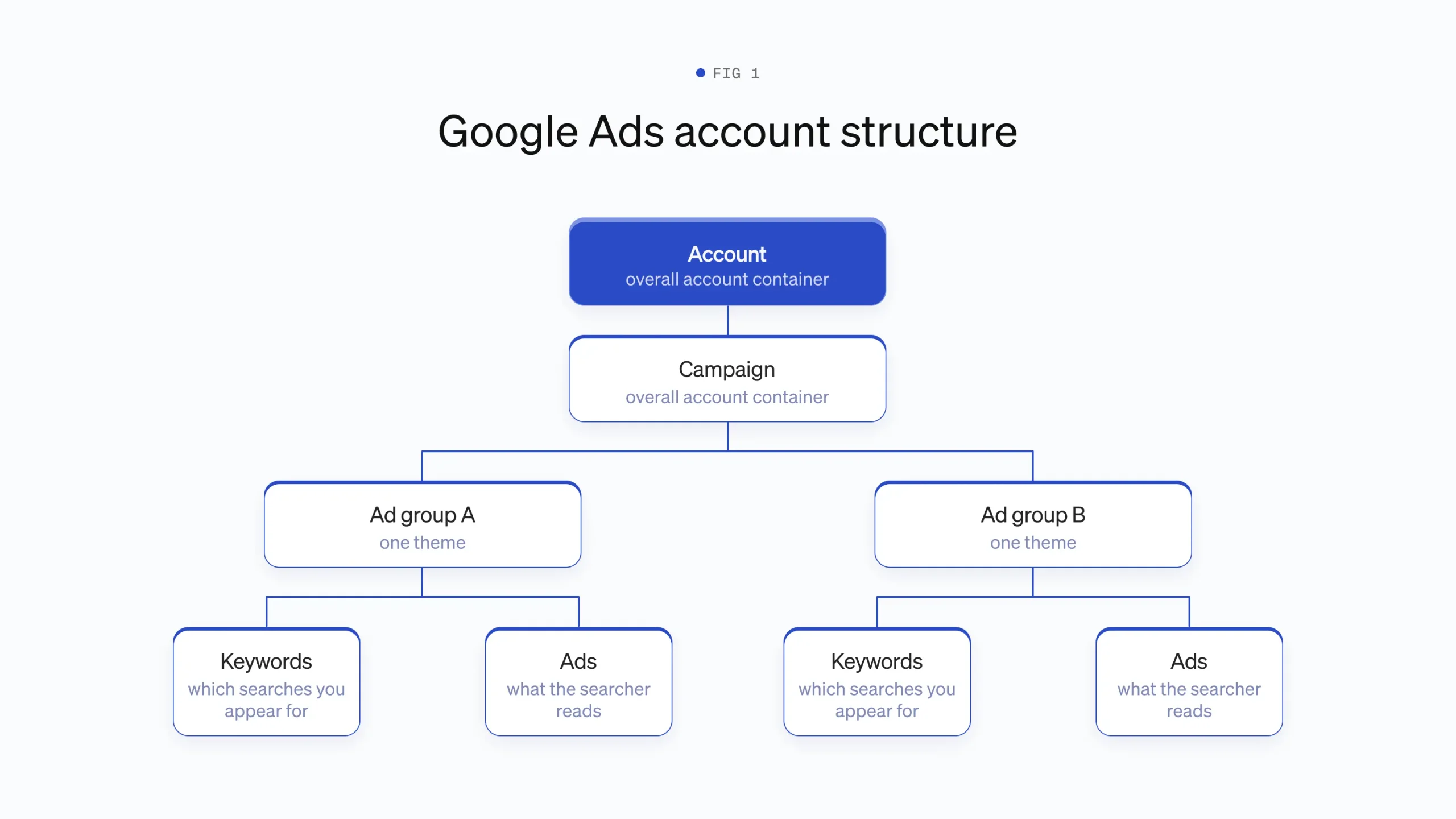
Google Ads has four layers, and each one controls something different. A campaign holds the budget, the location targeting and the bidding strategy. Inside a campaign sit ad groups, and each ad group holds a set of keywords and the ads that run against them. The keyword decides which searches you appear for. The ad is what the searcher reads. Keep one theme per ad group, so the ad can speak to the keyword. An ad group named “payroll software” with keywords about payroll and an ad about payroll will do better than one ad group holding everything you sell.
The setup sequence
Do the steps in this order, because conversion tracking has to exist before the campaign runs. Interface names below are as they appear in Google Ads in 2027. Google renames things every few years, so if a menu item is missing, search the Ads help pages for the term.
- Create the account at ads.google.com, and when the setup wizard offers a “Smart” campaign, choose “Switch to Expert Mode” instead. Smart campaigns hide the controls you need.
- Set up conversion tracking first. Go to Goals, then Conversions, then New conversion action, choose Website, and follow the flow to create an action for your form’s thank-you page. Install the Google tag on every page of your site, either directly or through Google Tag Manager. Then submit your own form and confirm the conversion appears in the account within a day.
- Create a new campaign, choose the goal “Leads” or “Create a campaign without a goal’s guidance”, and pick the campaign type Search.
- In Networks, untick “Include Google search partners” and untick “Include Google Display Network”. Both boxes are ticked by default. Display placements and partner sites produce cheap clicks of low intent, and they will blur the answer your first campaign exists to give you.
- Set Locations to the area you serve, and change the setting from “Presence or interest” to “Presence” so you pay for people in the area rather than people interested in it.
- Choose the bidding strategy Manual CPC, or Maximise Clicks with a maximum cost-per-click limit set. The reasons are below.
- Build two or three ad groups, each with 5 to 15 closely related keywords in phrase and exact match.
- Add your starting negative keyword list at campaign level, under Keywords, then Negative keywords.
- Write one responsive search ad per ad group, pointing at the most specific page you have for that theme, not the homepage.
- Add assets: sitelinks, callouts and a call asset if you take phone enquiries. Then launch.
Match types, with a worked example
The match type decides how far Google may stray from your keyword, and the default strays furthest. Take the keyword payroll software for small business. The table shows what each match type lets it appear for.
| Match type | How you write it | Would match | Would not match |
|---|---|---|---|
| Broad | payroll software for small business | “free payroll app”, “how to do payroll yourself”, “small business accounting” | Very little is excluded. Broad match reaches anything Google judges related. |
| Phrase | “payroll software” | “best payroll software uk”, “payroll software for restaurants” | “how to run payroll in a spreadsheet” |
| Exact | [payroll software for small business] | “payroll software small business”, “small business payroll software” | “payroll software for enterprises”, most longer variations |
Start with phrase and exact only. Broad match hands control of your targeting to Google’s matching system, which works better once the account has conversion history and badly before it. Note that even exact match is no longer literal. Google treats it as “same meaning”, so check the search terms report rather than trusting the brackets.
The negative keywords to start with
Add negatives before launch, because the first rupee wasted is the easiest to save. A negative keyword blocks your ads from searches containing that term. For most B2B services the starting list is: free, jobs, job, careers, salary, salaries, course, courses, training, tutorial, template, download, diy, “what is”, definition, examples, and the names of any competitors you do not want to bid on. Add the names of services you do not offer. A payroll software company adds “pension” if it does not handle pensions. After launch, the search terms report becomes the source of new negatives, and in the first month it matters more than any other report in the account.
Writing the ads
A responsive search ad takes up to 15 headlines of 30 characters each and up to 4 descriptions of 90 characters each, and Google assembles combinations from them. Those limits have held for several years and are current as of 2027. You do not need all 15 headlines. Eight to ten distinct ones give the system enough to work with. Write headlines that include the keyword, headlines that state what makes you different, and headlines that name the next step. If one headline must always show, pin it to position one, at the cost of fewer combinations for the system to test. Say who the service is for and what it costs to find out more. An ad that filters out the wrong clickers saves more than an ad that attracts extra ones.
Assets, which Google called extensions until 2022, extend the ad at no extra cost per click. Three matter for a first campaign. Sitelinks add extra links under the ad, so add four pointing at your pricing, case studies, contact and about pages. Callouts are short unlinked phrases, so use them for facts: years trading, sectors served, response time. A call asset shows your phone number, which matters if enquiries come by phone. The others, image and promotion and price assets, can wait.
Bidding and budget
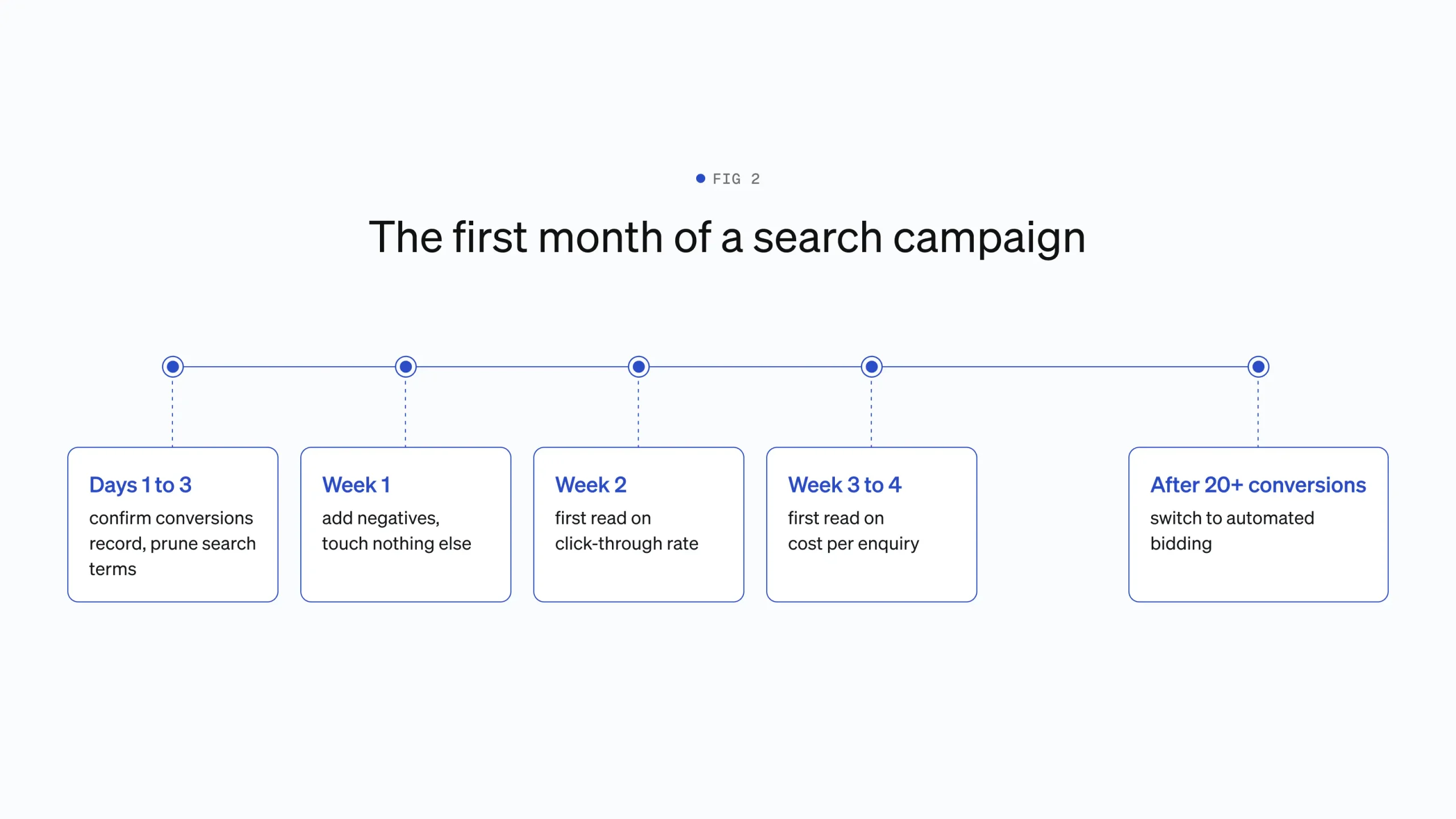
Maximise Conversions is a poor first choice because it is a machine learning strategy with nothing to learn from. It instructs Google to spend your full budget chasing conversions, and with no conversion history in the account it has no signal about which clicks convert. In practice a new account on Maximise Conversions tends to pay high prices for clicks the system is guessing about, and it can spend a day’s budget in an hour. Start on Manual CPC, or Maximise Clicks with a cost-per-click ceiling, until the account has recorded 20 to 30 conversions. Then switch to Maximise Conversions, because at that point it has history and tends to outperform manual bidding.
Set the daily budget by working back from clicks, not from a round number of currency. A usable minimum is a budget that buys at least 30 clicks a week, and 50 is better. Look up the typical cost per click for your keywords in Keyword Planner, under Tools, then multiply by 30 and divide by 7. If clicks in your market cost ₹320, that is a floor of about ₹1,360 a day. If your budget only buys 10 clicks a week, the campaign will take months to produce enough data to read, and a slow trickle of ambiguous data costs more in the end than a shorter, properly funded test.
The first two weeks
In the first two weeks you prune, and you resist the urge to redesign. Check the search terms report, under Insights and reports, every day or two, and add anything irrelevant as a negative keyword. Confirm conversions are recording. Check that no single keyword is eating the budget without converting. Do not rewrite the ads, change the bidding strategy or restructure the ad groups in week one, because every structural change restarts the learning you are trying to read.
Be clear about what a first campaign will and will not tell you. After 100 to 200 clicks it will tell you whether searchers in your market click your ad, roughly what a click costs, and whether your landing page turns clicks into enquiries at all. It will not tell you your long-run cost per lead, which keywords are best, or whether the channel is profitable, because those answers need 20 or more conversions per variant and most first campaigns take one to three months to accumulate that. Treat the first month as the price of real numbers, not as the verdict on the channel.
Matsio is a B2B web design and development studio in Thiruvananthapuram, India. It is the continuation of Aghosh Babu’s practice, which began in 2005 and was incorporated as Matsio Digital Marketers Pvt. Ltd. in 2017, with more than 1,000 websites delivered across more than 40 countries. Campaign landing pages are a regular part of the studio’s work, and the most common finding is that a campaign judged to be failing was sending well-matched traffic to a page written for a different audience. The page is cheaper to fix than the targeting, and it is worth checking first. 85% of the studio’s clients return for further work, measured across every engagement since 2005.
Paid social for business buyers
Paid social shows ads to people who match a profile rather than people who typed a search, which makes it a different tool answering a different question. Search finds existing demand. Social interrupts people who were doing something else, so the ad has to supply the reason to care. That difference decides which platform, and whether paid social belongs in your plan at all.
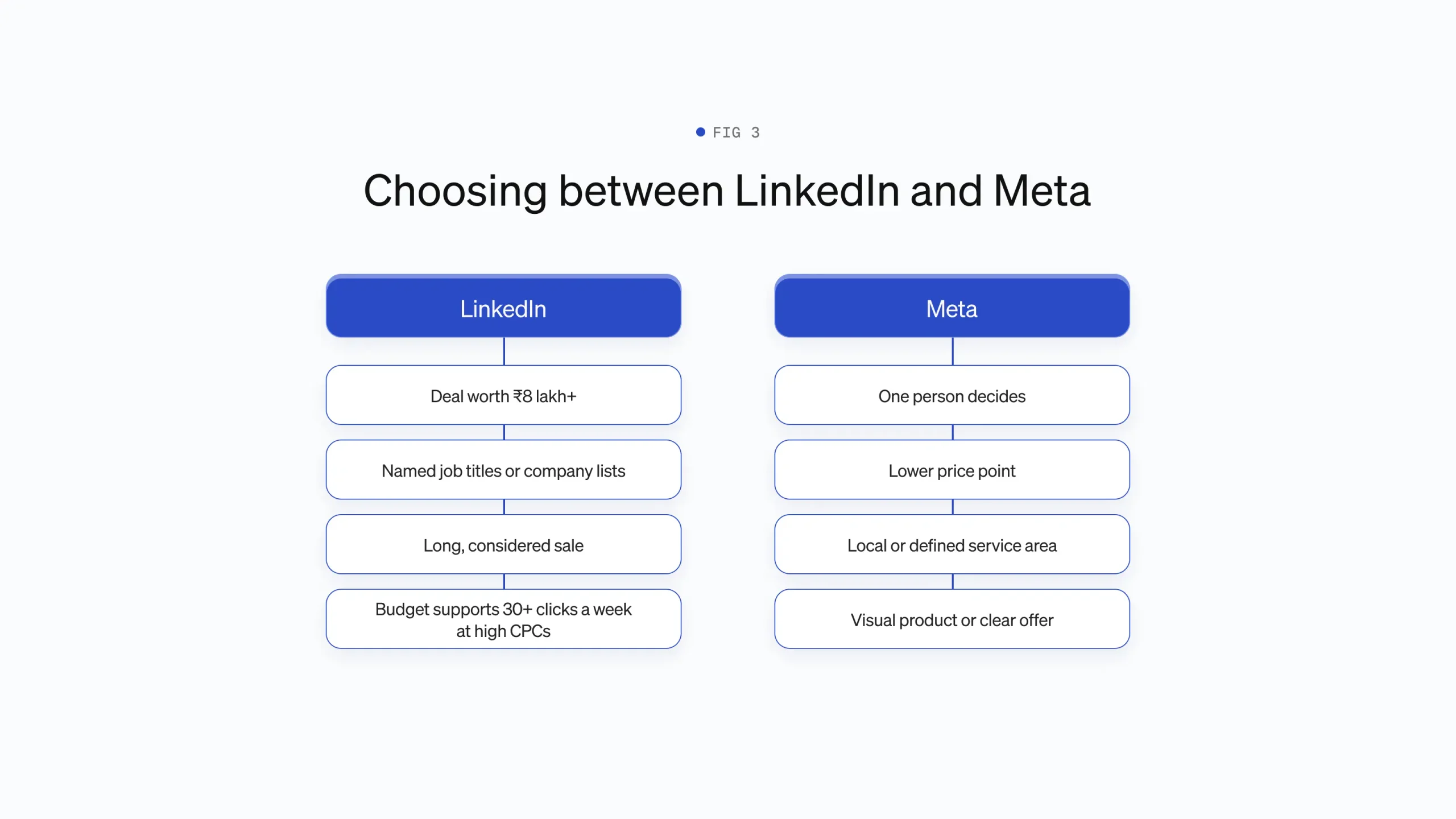
LinkedIn’s advantage is targeting that no other platform can match for B2B. Campaign Manager lets you target by job title, by seniority, by company size, by industry, by skills, and by uploaded lists of named companies or contacts. If your buyer is “finance directors at UK manufacturers with 50 to 500 staff”, LinkedIn is the only platform where you can say that and have it be roughly true. The profile data is self-reported and goes stale, so expect some slippage, but nothing else comes close.
The price of that targeting is a high cost per click, often several times what search or Meta charges for the same market. That arithmetic decides who LinkedIn suits. If a won deal is worth ₹8 lakh or more, paying a multiple per click for the right job titles is a fair trade. If you sell a ₹4,000-a-month product with a self-serve signup, the sums rarely work, because the cost of enough clicks to produce a customer exceeds what the customer is worth for a year or more. LinkedIn suits considered purchases, long sales cycles and narrow audiences. It punishes low prices and broad ones.
Lead Gen Forms trade lead quality for lead volume. These are LinkedIn’s native forms that open inside the platform, pre-filled from the person’s profile, so nobody visits your site. They reliably produce more form fills per rupee than sending traffic to a landing page, because the friction is near zero. The same absence of friction means many of those leads barely remember filling in the form, and follow-up speed decides whether they are worth anything. Use Lead Gen Forms when you have someone who will call or email within a day. Send traffic to your site when you want fewer, warmer enquiries, and make the destination page do its job, as covered in How demo request pages earn the click.
There is a budget below which LinkedIn is not worth starting. The platform’s own minimum daily spend is small, but the practical minimum is set by click prices. Apply the same rule as search: enough budget for at least 30 clicks a week. At LinkedIn’s click prices that commonly means a four-figure monthly budget. Below that, the campaign produces a handful of clicks a week and no readable result, and the money teaches you nothing.
Meta
Meta works for business buyers when the buyer is a person making a modest decision, and fails when the buyer is a committee. Facebook and Instagram have no reliable job title targeting. What they have is enormous reach, low click prices, and an ad delivery system that finds people who behave like your existing converters. A sole trader choosing accounting software, a restaurant owner choosing a booking system, a dentist choosing a website provider, all of these are business purchases made by one person who scrolls Instagram like anyone else. Meta reaches them at a fraction of LinkedIn’s cost. A six-person procurement decision at a 2,000-person company is not findable this way.
Targeting on Meta means interests, lookalikes, or handing delivery to the system. Interest targeting reaches people whose behaviour suggests a topic, such as “small business owners”, and it is loose. Lookalike audiences take a source list, such as your customer emails, and find people who resemble them, and they need a source of several hundred people to work with. Meta’s current default, Advantage+ audience, ignores most manual targeting and optimises against your conversion data, which works once you have conversions and flails before. The pattern mirrors search bidding: manual control first, automation once there is history.
Meta fits local and lower-considered business purchases. If you serve a defined area, radius targeting plus a plain offer performs well for trades, clinics, agencies and local services. If the purchase is under a few tens of thousands of rupees a month and one person decides, Meta deserves a test before LinkedIn does.
Retargeting on both
Retargeting shows ads to people who already visited your site, and it is the cheapest audience either platform offers. On Meta the audience is built from the Meta Pixel on your site. On LinkedIn it is the Insight Tag, plus retargeting of people who engaged with your ads or company page. B2B sales cycles run weeks to months, and retargeting keeps you visible across that gap for a small spend. Two cautions. Set a frequency cap, because following one visitor around the internet for months reads as desperation. And exclude people who already enquired, by excluding visitors to your thank-you page, so you stop paying to persuade the persuaded.
Who should not use paid social at all
Some companies should close this section and spend the money elsewhere. If your service is bought at a known moment of need, such as emergency repairs, legal trouble or a broken system, buyers search at that moment and do not respond to interruption, so search takes the whole budget. If your total addressable market is a few hundred named companies, buy lists and do direct outreach, because paying an auction to maybe reach people you could email is a bad trade. If your deal size is small and your audience is senior, the click prices needed to reach them exceed what a customer is worth. And if you cannot answer enquiries within a working day, no paid channel will pay back, because speed to follow-up is where paid leads are won or thrown away.
What to do when the campaign does not work
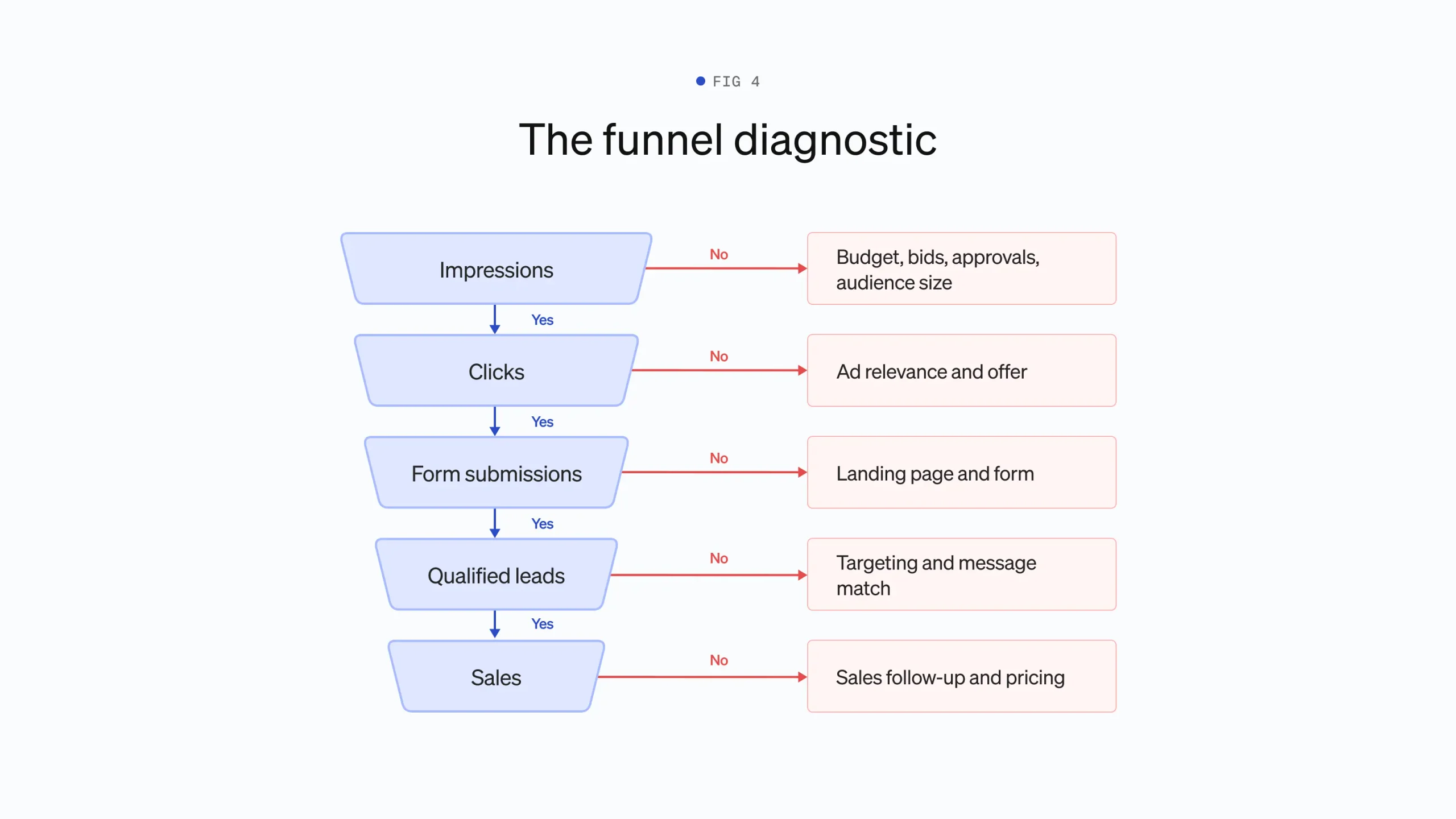
A failing campaign fails at one identifiable stage of the funnel, and the fix depends entirely on which stage that is. The mistake most advertisers make is to change several things at once, which repairs nothing and destroys the diagnosis. Work down the funnel in order, find the first stage where the numbers break, and fix only that.
No impressions
If the ads are not showing, the cause is administrative or financial, not creative. Check, in order: the campaign and ads say Enabled, not Paused. The ads say Approved, since new ads sit in review for up to a day and disapprovals are easy to miss. Billing is set up and the first payment went through. Then check the Status column on your keywords. “Below first page bid” means your bid is too low for your market, so raise the CPC ceiling. On social, an audience the platform reports as too small will not deliver, so widen one targeting layer at a time until it does. If impressions exist but are few, the budget is exhausting early in the day. The fix is more budget or fewer keywords, not patience.
Impressions but no clicks
People see the ad and choose not to click, which means the ad does not match what they wanted or offers no reason to act. On search, open the search terms report first. If the searches are not what you expected, this is a targeting problem wearing a creative disguise, and the fix is match types and negatives. If the searches are right, the ad is the problem. A search ad that does not contain the searcher’s words reads as irrelevant, so put the keyword in a headline. On social, no clicks usually means the creative gives a stranger no reason to stop, and the fix is a more concrete promise or a different image, changed one at a time. As a rough reference point, search ads for services that fall below a 2% click-through rate on relevant terms have room to improve, though the range across industries is wide and your own baseline matters more than any benchmark.
Clicks but no form submissions
Before blaming the page, confirm the tracking, because a broken conversion tag looks identical to a failing page. Submit your own form and watch for the conversion. While you are there, check who is clicking. Automated traffic can inflate click counts and will never convert, and What synthetic traffic means for your analytics covers how to spot it. If tracking is sound and the clicks are human, the page is failing the visitor. The common causes are a page that does not repeat the ad’s promise, a form asking for more than the visitor is ready to give, a slow mobile load, and a wall of options where one action should be. That last failure has a literature behind it, covered in What the paradox of choice means for pricing pages. Fix message match first. The page’s first heading should answer the ad that was clicked.
Form submissions but no qualified leads
Enquiries from the wrong people mean the campaign is reaching the wrong audience or making a promise the business does not keep. Read ten recent unqualified leads and sort them into two piles. Wrong person, such as students, job seekers and companies too small to buy, points to targeting, so tighten match types, add negatives, or narrow the social audience. Right person with the wrong expectation points to the message, and the usual culprit is an ad or page that hides the price. Enquirers who would never pay your rates are a cost of silence about cost, and How pricing transparency affects B2B pipeline covers the trade-off. Stating a starting price in the ad cuts lead volume and raises lead quality, and for most small companies that trade is worth taking.
Qualified leads but no sales
If the right people enquire and do not buy, the campaign has done its job and the problem is after the form. Check response time first, because paid leads cool within hours and a next-day reply loses to a same-hour competitor. Check what the follow-up says, since a lead answered with a generic brochure email dies where a specific answer to their enquiry would live. Check price against what the ad implied. None of this is fixable in the ad account, and spending more on a campaign that feeds a broken follow-up process buys a longer list of people you disappointed.
A bad campaign or an early one
Most campaigns judged failures were judged on sample sizes that cannot support a verdict. Click-through rate becomes readable after a few hundred impressions per ad. Conversion rate needs clicks, and at a typical few-percent conversion rate you need 100 clicks before zero conversions means much, because at a 3% rate, 50 clicks produce zero conversions about a fifth of the time by chance alone. Cost per lead needs 10 to 20 conversions before the average settles. Comparing two ads or two pages needs more again, and the arithmetic of what a difference proves is the same as in any split test, which What an A/B test measures, and how to read the results sets out. The practical rule: do not judge a stage of the funnel until the stage above it has fed it at least 100 events, and date every change you make so you can read the data in clean windows.
Targeting, message or page
Every underperforming campaign has one of three root causes, and each leaves a different fingerprint. A targeting problem shows the wrong people at the top of the funnel, and you find it in the search terms report and in who the leads are. A message problem shows the right people declining to click, or clicking and bouncing inside seconds, and you find it by comparing what the ad promises with what the searcher wanted. A page problem shows the right people clicking the right ad and then leaving without acting, and you find it by watching session recordings and reading the page as a first-time visitor would. The order of investigation is fixed: targeting first, then message, then page, because a page cannot convert visitors who should never have arrived, and no amount of copywriting rescues an ad shown to the wrong audience. Diagnosing the page layer does not require enterprise tooling, and How to run a conversion research program on a small budget covers doing it with a recording tool, a form analytics report and ten user comments. Change one layer at a time, give it 100 events, and read the result before touching the next.
Related reading. What happens after someone fills in your form covers what a click is worth once it becomes an enquiry, which is the figure every campaign budget is judged against, and Lead generation channels beyond search and social covers the channels to try when paid search proves too expensive for the deal size.
The short version
A first search campaign is a narrow test run on deliberate settings. Expert Mode rather than the Smart campaign, conversion tracking built and tested before launch, two or three single-theme ad groups in phrase and exact match, negatives added on day one, search partners and Display switched off, and manual bidding until the account has 20 to 30 conversions for automation to learn from. The budget buys at least 30 clicks a week, because below that the campaign produces ambiguity rather than data. For the first two weeks the work is pruning the search terms report, and nothing structural changes.
Paid social is a decision about who your buyer is. LinkedIn reaches named job titles at named companies and charges accordingly, which suits considered deals worth ₹8 lakh or more. Meta cannot see job titles but reaches business decisions made by one person, the sole trader or the clinic owner, at a fraction of the cost. Retargeting past visitors is the cheapest spend on either platform. And some businesses, those bought at a moment of urgent need or those selling to a few hundred named companies, should put the money into search or direct outreach instead.
A campaign that underperforms fails at one stage: impressions, clicks, form submissions, qualified leads or sales. Work down the funnel in that order, fix the first broken stage, change one thing at a time and give each change around 100 events before judging it. The campaign is also one link in a longer chain, and the end-to-end lead generation process covers the rest of it: the positioning and pages that need to exist before the first ad runs, and the follow-up and measurement after the form that decide whether a lead becomes revenue.
A small thing and a big thing
One small thing to fix on your website today, and one big thing to learn that gets you more leads.




 Your information is
safe with us. No spam.
Your information is
safe with us. No spam.